One reason windows explorer may be running slow is Digital Signatures are enabled. It is important to shut this off if you are using any WAN accelerator such as Riverbed appliances.
I run this registry edit when my users login to ensure it's off.
Windows Registry Editor Version 5.00
[HKEY_CURRENT_USER\Software\Autodesk\Autodesk Digital Signatures]
"IconOverlayEnabled"=dword:00000000
If you copy the above 3 lines into a text file with the extension .reg you can manually run it by double clicking the file. It will prompt you if you want to add the information to the registry.
Disclaimer: Working with the registry should be done with caution. Make a backup prior to making changes.
I've only tested this on AutoCAD 2008 Land Desktop and Civil 3D installations. I've never had to mess with it again.
Sunday, February 01, 2009


Thursday, January 29, 2009
Turn off node osnap snapping to mtext objects
Command: osnapnodelegacy
Enter new value for OSNAPNODELEGACY <0>: 1
Set to 1 to ignore Text corners.
This setting makes working with Topography Shots easier.
Enter new value for OSNAPNODELEGACY <0>: 1
Set to 1 to ignore Text corners.
This setting makes working with Topography Shots easier.
Tuesday, January 27, 2009
Comparing Drawing Differences Using Autodesk Design Review 2009
When working on commercial development projects one thing is for certain, site layouts change. I had the daunting task of creating an exhibit that shows the difference between the 1st site layout vs. the final layout. I started out by using xref overlays and changing colors to see any discrepancies. After panning around looking for an hour I knew there had to be a better way.
That better way is Autodesk Design Review 2009. It's Free.
Here are the steps to compare two drawings (dwg):
- Open the 1st drawing.
- Plot to a dwf file using "DWF6ePlot.pc3" driver.
(If you don't have it in your plotter list then search for it under the directory C:\Documents and Settings\"Your Login User Name"\. You will need to copy the .pc3 file into your plotter directory. AutoCAD Menu: File > Plotter Manager... will open it in windows explorer.)
- Use a logical name like "OriginalSiteLayout.dwf"
- Repeat for the 2nd drawing.
- Use a logical name like "FinalSiteLayout.dwf"
Here's the kicker! You must use the same plot area with the same pen file. Using window helps.
Tip: Use the thinnest pens you have. You'll get better results.
- Open the 1st dwf file in Design Review.
- Menu: Tools > Compare...
- Press Browse... and select the 2nd dwf file.
- Press Options (Bottom Left Corner) for Color options. Note colors or change them if desired.
- Press OK then OK once more.
Note that you have now made a change to the 1st dwf file opened. Make a backup prior if you wish or SaveAs at this point.
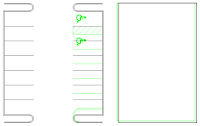
I used this comparison file to quickly identify the areas that changed. I still used the Xref overlay for plotting purposes but at least this gave me an idea of exactly where to look.
I inserted the comparison dwf file in my drawing but it didn't show the compared geometry (2nd dwg file). If you know how to do that feel free to comment. I will update this post if I find a solution. I suppose you can underlay both the 1st and 2nd dwf file but you wouldn't see the color comparison.
Hope this saves you some time!
That better way is Autodesk Design Review 2009. It's Free.
Here are the steps to compare two drawings (dwg):
- Open the 1st drawing.
- Plot to a dwf file using "DWF6ePlot.pc3" driver.
(If you don't have it in your plotter list then search for it under the directory C:\Documents and Settings\"Your Login User Name"\. You will need to copy the .pc3 file into your plotter directory. AutoCAD Menu: File > Plotter Manager... will open it in windows explorer.)
- Use a logical name like "OriginalSiteLayout.dwf"
- Repeat for the 2nd drawing.
- Use a logical name like "FinalSiteLayout.dwf"
Here's the kicker! You must use the same plot area with the same pen file. Using window helps.
Tip: Use the thinnest pens you have. You'll get better results.
- Open the 1st dwf file in Design Review.
- Menu: Tools > Compare...
- Press Browse... and select the 2nd dwf file.
- Press Options (Bottom Left Corner) for Color options. Note colors or change them if desired.
- Press OK then OK once more.
Note that you have now made a change to the 1st dwf file opened. Make a backup prior if you wish or SaveAs at this point.

I used this comparison file to quickly identify the areas that changed. I still used the Xref overlay for plotting purposes but at least this gave me an idea of exactly where to look.
I inserted the comparison dwf file in my drawing but it didn't show the compared geometry (2nd dwg file). If you know how to do that feel free to comment. I will update this post if I find a solution. I suppose you can underlay both the 1st and 2nd dwf file but you wouldn't see the color comparison.
Hope this saves you some time!
Friday, December 12, 2008
Why can't Autodesk make AutoCAD a stable product?
I don’t have the answer to this question. I just have an opinion.
I received a comment to my Fix broken hatch patterns post.
Why can't Autodesk make a stable product? – vanilla ice
Short answer, I’m not sure the AutoCAD team can ever perfect it. It’s constantly evolving. They build the platform. Verticals build upon it. Somewhere along the lines there are going to be issues. Check out their product line. Quite daunting.
Here are my 2 cents. I've been using AutoCAD since r12 so I know what a stable product looks, acts, and feels like. Major bugs get introduced when overhauls to the architecture of the software are made and of course new features. R13 anyone? R14 got it right. Note the 2 year trend. Everyone adopted the philosophy "Never upgrade to an odd release."
To Autodesk’s defense, they can’t possibly test new features in every possible scenario. Anyone who has written a simple LISP routine can attest. Autodesk’s “1 release every year” has a lot to do with the plethora of bug issues. Releasing a new version every year is one way to justify the cost of subscription. If they don't add new features then it’s tough to justify. Many people have surveyed this subject. I agree with the majority that Autodesk shouldn't release every year. I prefer a solid product release. Take Civil 3D for a prime example. 2004 was the first public release and it took them till Service Pack 3 for 2007 to get it stable. Ok, 2004 & 2005 was just to get it into the people’s hands to help guide it and give input. 2006 and 2007 were prime time! 2 years plus service packs. Thank you, Autodesk for getting it stable and running. Good riddance to Land Desktop!
I’m going to agree that Autodesk needs to focus on ironing out new features before a major release. 2006 CUI was horrific. It took service packs and a major release to fix that one. Some would argue it’s still not fixed.
What can you do to make Autodesk products better?
- AUGI forums. It’s also where you can get free support.
- Sending those error reports when you crash. I said when not if.
- Autodesk forums
- Communicate with your Autodesk reseller
- Cadalyst.com
Thanks for reading my 2 cents. Feel free to comment.
Have a Merry Christmas and a Happy New Year!!!
Appended Dec. 13, 2008
I'm going to add one thing to Autodesk's defense. Service pack 1 typically resolves most of the issues presented by new features. Mostly... Reading Bug Watch by Cadalyst opens your eyes to bugs you may never run into.
My intention with this post is to let people, who are the culprits, know that software at this magnitude is inevitably going to have bugs. I agree, old bugs are not easily forgivable as new ones.
AutoCAD-IntelliCAD's response drives home the point I made above. Autodesk products should be as solid as possible prior to a release especially for the cost. I have high expectations from Autodesk to deliver such a product. AutoCAD is a tool that has paid my bills for years and possibly even yours.
In closing I would say to give software companies a little longer of a leash than you would want or should. They're human beings with souls, hopefully all of them have one. Mistakes happen. The massive level of contributions from people like you and me help make products better with each release. Without our voice they don't know what we want or need.
I received a comment to my Fix broken hatch patterns post.
Why can't Autodesk make a stable product? – vanilla ice
Short answer, I’m not sure the AutoCAD team can ever perfect it. It’s constantly evolving. They build the platform. Verticals build upon it. Somewhere along the lines there are going to be issues. Check out their product line. Quite daunting.
Here are my 2 cents. I've been using AutoCAD since r12 so I know what a stable product looks, acts, and feels like. Major bugs get introduced when overhauls to the architecture of the software are made and of course new features. R13 anyone? R14 got it right. Note the 2 year trend. Everyone adopted the philosophy "Never upgrade to an odd release."
To Autodesk’s defense, they can’t possibly test new features in every possible scenario. Anyone who has written a simple LISP routine can attest. Autodesk’s “1 release every year” has a lot to do with the plethora of bug issues. Releasing a new version every year is one way to justify the cost of subscription. If they don't add new features then it’s tough to justify. Many people have surveyed this subject. I agree with the majority that Autodesk shouldn't release every year. I prefer a solid product release. Take Civil 3D for a prime example. 2004 was the first public release and it took them till Service Pack 3 for 2007 to get it stable. Ok, 2004 & 2005 was just to get it into the people’s hands to help guide it and give input. 2006 and 2007 were prime time! 2 years plus service packs. Thank you, Autodesk for getting it stable and running. Good riddance to Land Desktop!
I’m going to agree that Autodesk needs to focus on ironing out new features before a major release. 2006 CUI was horrific. It took service packs and a major release to fix that one. Some would argue it’s still not fixed.
What can you do to make Autodesk products better?
- AUGI forums. It’s also where you can get free support.
- Sending those error reports when you crash. I said when not if.
- Autodesk forums
- Communicate with your Autodesk reseller
- Cadalyst.com
Thanks for reading my 2 cents. Feel free to comment.
Have a Merry Christmas and a Happy New Year!!!
Appended Dec. 13, 2008
I'm going to add one thing to Autodesk's defense. Service pack 1 typically resolves most of the issues presented by new features. Mostly... Reading Bug Watch by Cadalyst opens your eyes to bugs you may never run into.
My intention with this post is to let people, who are the culprits, know that software at this magnitude is inevitably going to have bugs. I agree, old bugs are not easily forgivable as new ones.
AutoCAD-IntelliCAD's response drives home the point I made above. Autodesk products should be as solid as possible prior to a release especially for the cost. I have high expectations from Autodesk to deliver such a product. AutoCAD is a tool that has paid my bills for years and possibly even yours.
In closing I would say to give software companies a little longer of a leash than you would want or should. They're human beings with souls, hopefully all of them have one. Mistakes happen. The massive level of contributions from people like you and me help make products better with each release. Without our voice they don't know what we want or need.
Thursday, January 17, 2008
Why are my Grips Missing?
1st check the variable GRIPS is set to 1.
If you still don't see them after selecting objects then you may have exceeded the GRIPOBJLIMIT. This variable controls how many objects will display grips within a selection. If your selection exceeds the amount then no grips will appear. Default is 100 objects. Increase the amount and try again. You may experience lag if this is substantially increased especially if you have Enable grips within blocks checked.
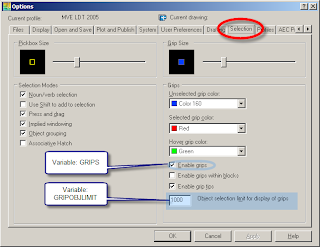
If you still don't see them after selecting objects then you may have exceeded the GRIPOBJLIMIT. This variable controls how many objects will display grips within a selection. If your selection exceeds the amount then no grips will appear. Default is 100 objects. Increase the amount and try again. You may experience lag if this is substantially increased especially if you have Enable grips within blocks checked.

Wednesday, December 12, 2007
Do you really want to do this?
Issue: I'm getting a message asking me, "Do you really want to do this?"
I stumbled upon this many moons ago. This is one fix I know of. Doesn't always do the trick so give it a try and hope for the best.
The issue I found was my Associative Hatch was using an Xreference Object as my boundary.
I used the Pick Points function in the Boundary Hatch command to create my hatching. I started to see this message shortly thereafter and sometimes after I've closed and reopened my drawing.
I stumbled upon this many moons ago. This is one fix I know of. Doesn't always do the trick so give it a try and hope for the best.
The issue I found was my Associative Hatch was using an Xreference Object as my boundary.
I used the Pick Points function in the Boundary Hatch command to create my hatching. I started to see this message shortly thereafter and sometimes after I've closed and reopened my drawing.
My Attributes are Missing
Issue: My attribute text in my title block is not shown. My Layer is Thawed and On. What gives?
Your attributes may be turned off. To return to default use this command.
Command: ATTDISP
Enter attribute visibility setting [Normal/ON/OFF]: N
Normal is default. Invisible attributes are not shown whilst others are.
Many Land Desktop users change this to ON so the profile attributes appear. What they forget is that they should use Normal to change it back, not OFF.
Your attributes may be turned off. To return to default use this command.
Command: ATTDISP
Enter attribute visibility setting [Normal/ON/OFF]
Normal is default. Invisible attributes are not shown whilst others are.
Many Land Desktop users change this to ON so the profile attributes appear. What they forget is that they should use Normal to change it back, not OFF.
Thursday, October 25, 2007
My Underscores are Missing from my Menus
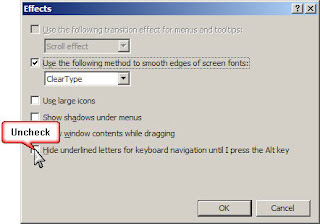
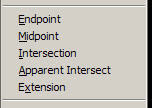
Issue: Your Menu Bar or Osnap Menu doesn't have underscores under key letters.

Windows 7: http://superuser.com/questions/16952/how-to-enable-underscore-shortcut-mnemonics-for-menu-items
This post goes hand in hand with my previous post called http://autocad-for-civils.blogspot.com/2007/10/how-to-speed-up-working-with-osnaps.html


Windows XP:
- Open the Control Panel
- Open Display
- Click Appearance Tab
- Press the Effects... Button
- Uncheck "Hide underlined...."

- Press OK Button
The underscores should appear instantly.


Windows 7: http://superuser.com/questions/16952/how-to-enable-underscore-shortcut-mnemonics-for-menu-items
This post goes hand in hand with my previous post called http://autocad-for-civils.blogspot.com/2007/10/how-to-speed-up-working-with-osnaps.html
How to speed up working with OSnaps
 What if I told you that when I work with Osnaps I never see the Osnap Menu? Ahh... Ooo... I don't mean use Toolbars. That would require screen real estate that I'm not willing to give up.
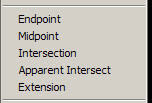
This menu can be accessed a few ways. (See Image -->)
- Middle Button down
- If your middle button is "Pan" then Shift+Right Click
(This function is controlled by the variable MBUTTONPAN)
Focus on the Underscore under Each Osnap.

Work flow...
- Draw a Line
- Bring up the Osnap Menu
(If you remember your Key Letter then just key it in. No menu clicking necessary.)
- Press E for Endpoint
Continue as usual.
If you don't see the underscores in this menu then see my next blog post to change a windows setting.
I hope this speeds you up. Happy Cading...
Subscribe to:
Posts (Atom)


 Posts
Posts


